Denoising Module
The denoising module implements self-supervised deep learning algorithms for noise reduction in microscopy images, including Noise2Void (N2V) and Noise2Noise (N2N). These methods enable effective denoising without requiring clean reference images.
Overview
Self-supervised denoising is crucial for improving image quality in low signal-to-noise ratio conditions common in cryo-ET, SXT, and other microscopy modalities. iPA provides two state-of-the-art approaches:
Noise2Void (N2V): Trains on single noisy images using blind-spot networks
Noise2Noise (N2N): Trains on pairs of noisy images of the same sample
Both methods are implemented as PyTorch-based classes with consistent APIs for training, prediction, and model management.
Key Features
Self-supervised Learning: No clean reference images required
3D Processing: Optimized for volumetric microscopy data
Tiled Prediction: Handle large volumes through intelligent tiling
Pre-trained Models: Ready-to-use models for common applications
GPU Acceleration: Fast training and inference on CUDA devices
N2V Class (Noise2Void)
- class ipa.processing.denoising.N2V(n_channels: int = 1, n_filters: int = 64, device: str | None = None)[source]
Bases:
BaseDenoiserNoise2Void denoiser.
Example
>>> from ipa.processing.denoising import N2V
>>>
>>> # Create denoiser
>>> n2v = N2V(n_filters=64)
>>>
>>> # Train on noisy data
>>> n2v.train(noisy_data, epochs=50, batch_size=4)
>>>
>>> # Predict
>>> denoised = n2v.predict(noisy_data)
>>>
>>> # Save/Load model
>>> n2v.save_model('n2v_model.pth')
>>> n2v.load_model('n2v_model.pth')
- train(train_data: ndarray, val_data: ndarray | None = None, epochs: int = 50, batch_size: int = 4, lr: float = 0.001, mask_ratio: float = 0.195, patch_size: tuple = (64, 64))[source]
Train the N2V model.
- Parameters:
train_data – Training data, shape (D, H, W) or (D, H, W, C)
val_data – Optional validation data
epochs – Number of training epochs (default: 50)
batch_size – Batch size (default: 4)
lr – Learning rate (default: 1e-3)
mask_ratio – Ratio of pixels to mask (default: 0.195)
patch_size – Patch size for training (default: (64, 64))
N2V Methods
The N2V class provides the following key methods:
Training:
train(train_data, val_data, epochs, batch_size, lr)- Train on noisy datasave_model(path)- Save trained model to fileload_model(path)- Load pre-trained model from file
Prediction:
predict(image, n_tiles)- Denoise a single image/volumepredict_batch(images, n_tiles)- Denoise multiple images
Example: Training and Prediction
from ipa.processing.denoising import N2V
import numpy as np

# Initialize N2V denoiser
n2v = N2V(
    n_channels=1,
    n_filters=64,
    learning_rate=1e-3
)

# Prepare training data (noisy volumes)
train_data = load_training_volumes()  # Your loading function
val_data = load_validation_volumes()

print(f"Training data shape: {train_data.shape}")
print(f"Validation data shape: {val_data.shape}")

# Train the model
n2v.train(
    train_data=train_data,
    val_data=val_data,
    epochs=50,
    batch_size=4,
    lr=1e-3
)

# Save trained model
n2v.save_model('models/n2v_sxt.pth')
print("Model saved successfully!")

# Predict on new data
noisy_volume = load_noisy_volume()  # Your loading function
denoised_volume = n2v.predict(
    noisy_volume,
    n_tiles=(2, 4, 4)  # Adjust based on GPU memory
)

print(f"Denoised volume shape: {denoised_volume.shape}")
print(f"Original range: [{noisy_volume.min():.3f}, {noisy_volume.max():.3f}]")
print(f"Denoised range: [{denoised_volume.min():.3f}, {denoised_volume.max():.3f}]")
Example: Using Pre-trained Model
from ipa.processing.denoising import N2V

# Load pre-trained model
n2v = N2V(n_channels=1, n_filters=64)
n2v.load_model('models/n2v_sxt.pth')

# Denoise SXT volume
sxt_volume = load_sxt_data()  # Shape: (Z, Y, X)
denoised = n2v.predict(sxt_volume, n_tiles=(1, 2, 2))

# Save result
save_denoised_volume(denoised, 'denoised_sxt.mrc')
N2N Class (Noise2Noise)
- class ipa.processing.denoising.N2N(n_channels: int = 1, n_filters: int = 64, device: str | None = None)[source]
Bases:
BaseDenoiserNoise2Noise denoiser.
Example
>>> from ipa.processing.denoising import N2N
>>>
>>> # Create denoiser
>>> n2n = N2N(n_filters=64)
>>>
>>> # Train on pairs of noisy images
>>> n2n.train(noisy_data_1, noisy_data_2, epochs=50, batch_size=4)
>>>
>>> # Predict
>>> denoised = n2n.predict(noisy_data)
>>>
>>> # Save/Load model
>>> n2n.save_model('n2n_model.pth')
>>> n2n.load_model('n2n_model.pth')
- train(noisy_data_1: ndarray, noisy_data_2: ndarray, val_data_1: ndarray | None = None, val_data_2: ndarray | None = None, epochs: int = 50, batch_size: int = 4, lr: float = 0.001, patch_size: tuple = (64, 64), loss_type: str = 'l1')[source]
Train the N2N model.
- Parameters:
noisy_data_1 – First set of noisy images
noisy_data_2 – Second set of noisy images (paired with data_1)
val_data_1 – Optional validation data (first set)
val_data_2 – Optional validation data (second set)
epochs – Number of training epochs (default: 50)
batch_size – Batch size (default: 4)
lr – Learning rate (default: 1e-3)
patch_size – Patch size for training (default: (64, 64))
loss_type – Loss function type, ‘l1’ or ‘mse’ (default: ‘l1’)
N2N vs N2V
When to use N2N:
You have pairs of noisy images of the same sample
Higher quality results are needed
Training time is not a constraint
When to use N2V:
Only single noisy images are available
Faster training is preferred
Good enough quality for downstream analysis
Example: N2N Training
from ipa.processing.denoising import N2N

# Initialize N2N denoiser
n2n = N2N(n_channels=1, n_filters=64)

# Prepare paired noisy data
# Each pair: (noisy_image_1, noisy_image_2) of the same sample
train_pairs = load_noisy_pairs()  # List of (img1, img2) tuples

# Train
n2n.train(
    train_pairs=train_pairs,
    epochs=100,
    batch_size=2,
    lr=1e-3
)

# Save and predict
n2n.save_model('models/n2n_cryoet.pth')
denoised = n2n.predict(noisy_volume)
Visualization and Quality Assessment
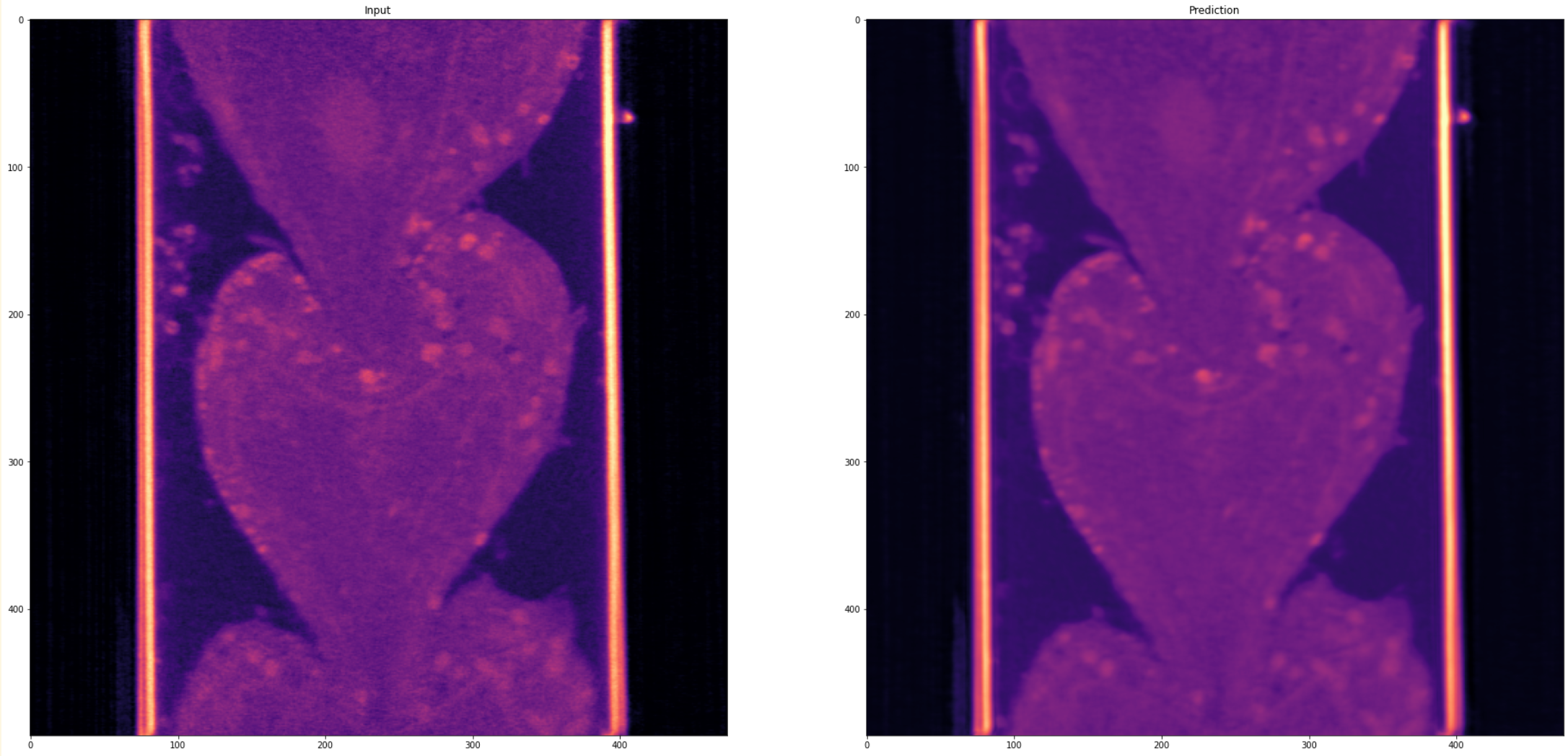
Figure: Example of N2V denoising on SXT data. Left: Original noisy volume; Right: Denoised result.
Visualizing Denoising Results
import matplotlib.pyplot as plt
import numpy as np
from ipa.processing.denoising import N2V

# Load and denoise
n2v = N2V(n_channels=1, n_filters=64)
n2v.load_model('models/n2v_sxt.pth')

noisy_volume = load_data()  # Your loading function
denoised_volume = n2v.predict(noisy_volume, n_tiles=(1, 2, 2))

# Visualize middle slice
slice_idx = noisy_volume.shape[0] // 2

fig, axes = plt.subplots(1, 3, figsize=(15, 5))

# Original
axes[0].imshow(noisy_volume[slice_idx], cmap='magma')
axes[0].set_title('Original (Noisy)', fontsize=12)
axes[0].axis('off')

# Denoised
axes[1].imshow(denoised_volume[slice_idx], cmap='magma')
axes[1].set_title('Denoised', fontsize=12)
axes[1].axis('off')

# Difference
diff = np.abs(noisy_volume[slice_idx] - denoised_volume[slice_idx])
im = axes[2].imshow(diff, cmap='hot')
axes[2].set_title('Difference', fontsize=12)
axes[2].axis('off')
plt.colorbar(im, ax=axes[2], fraction=0.046, pad=0.04)

plt.tight_layout()
plt.savefig('denoising_comparison.png', dpi=300, bbox_inches='tight')
plt.show()

# Print statistics
print(f"Original - Mean: {noisy_volume.mean():.3f}, Std: {noisy_volume.std():.3f}")
print(f"Denoised - Mean: {denoised_volume.mean():.3f}, Std: {denoised_volume.std():.3f}")
print(f"SNR Improvement: {(denoised_volume.std() / noisy_volume.std()):.2f}x")
Performance Tips
Memory Optimization:
Use appropriate
n_tilesparameter for large imagesTypical values:
(1, 2, 2)for small volumes,(2, 4, 4)for large volumesHigher tiling reduces memory usage but may increase processing time
Model Selection:
N2V: Best for single noisy images, faster training
N2N: Best for paired noisy images, potentially higher quality
Both models support custom architectures via
n_filtersandn_channelsparameters